---
title: How to update banking information
description: When the bank information has been changed or updated, it is imperative for them to update that information with Veem as soon as possible to ensure there are no disruptions to the payment(s).
---
[Skip to content](https://help.veem.com/hc/en-us/articles/360018979693-how-to-update-banking-information#main-content)
English
Show submenu for translations
[Customer portal](https://help.veem.com/tickets-view?hsLang=en)
[](https://www.veem.com/)
Open main navigation
Close main navigation
- English
Show submenu for translations
- [Customer portal](https://help.veem.com/tickets-view)
- [Contact us](https://www.veem.com/contact/)
[Contact us](https://www.veem.com/contact/)
How can we help you?
- There are no suggestions because the search field is empty.
1. [Help Center](https://help.veem.com/?hsLang=en)
2. [Account Management](https://help.veem.com/account-management?hsLang=en)
3. [Updating Banking Information](https://help.veem.com/account-management?hsLang=en#updating-banking-information)
# How to update banking information
## When the bank information has been changed or updated, it is imperative for them to update that information with Veem as soon as possible to ensure there are no disruptions to the payment(s).
Watch this video to learn how to update your bank details or follow the steps below:
**To edit/update the banking information :**
**Step 1:** Please [Log in](https://apps.veem.com/CustomerApp/o/signin) to your Veem account then go to settings.
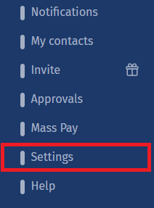
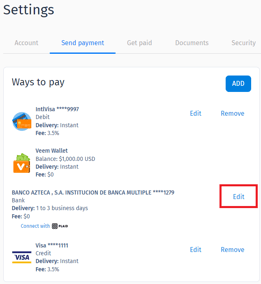
**Step 2:** Under settings, please go to the ***Send Payment or Get Paid tab.*** In the section called ***Ways to Pay or Ways to get paid***, locate the bank and click ***edit.***
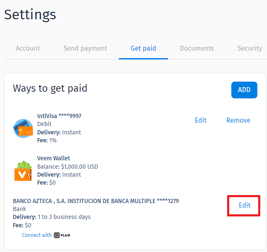
**Step 3:** A window titled Bank Information will open where the banking information can be edited and updated.
**Step 4:** Once all the required fields are filled, click update.
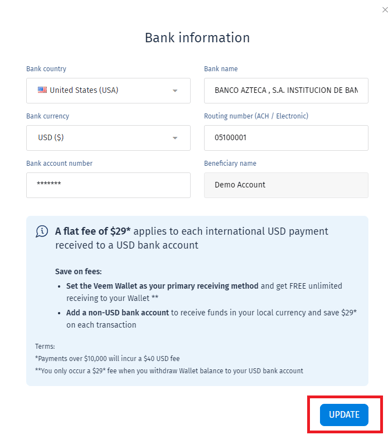
***Note:** Please note that updating the banking information will trigger a re-verification of the account. The account will be verified once a payment is received or within a few hours if there is already a payment in the process.*
Still, need help? [You can chat or call our Customer Success team here.](https://www.veem.com/contact/)
- [Product Updates](https://help.veem.com/product-updates?hsLang=en#main-content)
- [Changes to Veem Account | October 2026](https://help.veem.com/product-updates?hsLang=en#changes-to-veem-account-october-2026)
- [Changes to Veem Account | September 2026](https://help.veem.com/product-updates?hsLang=en#changes-to-veem-account-september-2026)
- [Changes to Veem Account | August 2026](https://help.veem.com/product-updates?hsLang=en#changes-to-veem-account-august-2026)
- [Changes to Veem Account | July 2026](https://help.veem.com/product-updates?hsLang=en#changes-to-veem-account-july-2026)
- [Changes to Veem Account | April 2026](https://help.veem.com/product-updates?hsLang=en#changes-to-veem-account-april-2026)
- [Changes to Veem Account | January 2026](https://help.veem.com/product-updates?hsLang=en#changes-to-veem-account-january-2026)
- [Changes to Veem Account | October 2025](https://help.veem.com/product-updates?hsLang=en#changes-to-veem-account-october-2025)
- [Changes to Veem Account | May 2025](https://help.veem.com/product-updates?hsLang=en#changes-to-veem-account-may-2025)
- [Changes to Veem Account | April 2025](https://help.veem.com/product-updates?hsLang=en#changes-to-veem-account-april-2025)
- [Changes to Veem Account | January 2025](https://help.veem.com/product-updates?hsLang=en#changes-to-veem-account-january-2025)
- [Changes to Veem Account | December 2024](https://help.veem.com/product-updates?hsLang=en#changes-to-veem-account-december-2024)
- [Changes to Veem account | September 2024](https://help.veem.com/product-updates?hsLang=en#changes-to-veem-account-september-2024)
- [Changes to Veem account | July 2024](https://help.veem.com/product-updates?hsLang=en#changes-to-veem-account-july-2024)
- [Changes to Veem account | August 2023](https://help.veem.com/product-updates?hsLang=en#changes-to-veem-account-august-2023)
- [Changes to Veem account | January 2023](https://help.veem.com/product-updates?hsLang=en#changes-to-veem-account-january-2023)
- [Changes to Veem account | July 2022](https://help.veem.com/product-updates?hsLang=en#changes-to-veem-account-july-2022)
- [Changes to Veem account | June 2022](https://help.veem.com/product-updates?hsLang=en#changes-to-veem-account-june-2022)
- [Changes to Veem account | May 2022](https://help.veem.com/product-updates?hsLang=en#changes-to-veem-account-may-2022)
- [Veem Wallet](https://help.veem.com/veem-wallet?hsLang=en)
- [Virtual Bank Account](https://help.veem.com/virtual-bank-account?hsLang=en)
- [Veem Virtual Card](https://help.veem.com/veem-virtual-card?hsLang=en)
- [Security and Compliance](https://help.veem.com/security-and-compliance?hsLang=en)
- [Accountant and Bookkeepers](https://help.veem.com/accountant-and-bookkeepers?hsLang=en)
- [Getting Started for Business](https://help.veem.com/getting-started-for-business?hsLang=en#main-content)
- [Getting Started - Business Account](https://help.veem.com/getting-started-for-business?hsLang=en#getting-started-business-account)
- [Getting Started for Contractors](https://help.veem.com/getting-started-for-contractors?hsLang=en#main-content)
- [Getting Started - Individuals, Contractors and Sole Proprietorship accounts](https://help.veem.com/getting-started-for-contractors?hsLang=en#getting-started-individuals-contractors-and-sole-proprietorship-accounts)
- [Veem Integrations](https://help.veem.com/veem-integrations?hsLang=en#main-content)
- [Xero](https://help.veem.com/veem-integrations?hsLang=en#xero)
- [Zapier](https://help.veem.com/veem-integrations?hsLang=en#zapier)
- [Integrations FAQ](https://help.veem.com/veem-integrations?hsLang=en#integrations-faq)
- [Netsuite](https://help.veem.com/veem-integrations?hsLang=en#netsuite)
- [QuickBooks](https://help.veem.com/veem-integrations?hsLang=en#quickbooks)
- [Signing Up on Veem](https://help.veem.com/signing-up-on-veem?hsLang=en)
- [Account Management](https://help.veem.com/account-management?hsLang=en#main-content)
- [Manage your Veem Account](https://help.veem.com/account-management?hsLang=en#manage-your-veem-account)
- [Updating Banking Information](https://help.veem.com/account-management?hsLang=en#updating-banking-information)
- [Updating the Account](https://help.veem.com/account-management?hsLang=en#updating-the-account)
- [Beneficial Ownership Information](https://help.veem.com/account-management?hsLang=en#beneficial-ownership-information)
- [Veem Basics FAQ](https://help.veem.com/veem-basics-faq?hsLang=en)
- [Sending Payments](https://help.veem.com/sending-payments?hsLang=en#main-content)
- [Payment Tracker](https://help.veem.com/sending-payments?hsLang=en#payment-tracker)
- [Mass Pay](https://help.veem.com/sending-payments?hsLang=en#mass-pay)
- [Payments FAQ](https://help.veem.com/sending-payments?hsLang=en#payments-faq)
- [Pay Direct](https://help.veem.com/sending-payments?hsLang=en#pay-direct)
- [Guest Pay](https://help.veem.com/sending-payments?hsLang=en#guest-pay)
- [Pay with Credit Card or Debit Card](https://help.veem.com/sending-payments?hsLang=en#pay-with-credit-card-or-debit-card)
- [Pay with Veem](https://help.veem.com/sending-payments?hsLang=en#pay-with-veem)
- [Receiving Payments](https://help.veem.com/receiving-payments?hsLang=en#main-content)
- [Get Paid with Veem](https://help.veem.com/receiving-payments?hsLang=en#get-paid-with-veem)
- [Instant Deposit - Debit Card](https://help.veem.com/receiving-payments?hsLang=en#instant-deposit-debit-card)
- [Payment Troubleshooting](https://help.veem.com/payment-troubleshooting?hsLang=en#main-content)
- [Bank Information Tips & Updates](https://help.veem.com/payment-troubleshooting?hsLang=en#bank-information-tips-updates)
- [Payment Troubleshooting FAQs](https://help.veem.com/payment-troubleshooting?hsLang=en#payment-troubleshooting-faqs)
- [How - To Videos](https://help.veem.com/how-to-videos?hsLang=en)
- [Payment Tracker Statuses](https://help.veem.com/payment-tracker-statuses?hsLang=en)
[](http://www.veem.com/https://www.veem.com/?utm_source=hubspot&utm_medium=email&utm_campaign=email_marketing)
1160 Battery Street,
Suite 100
San Francisco, CA 94111
Copyright © 2026, Veem Inc