---
title: How to Download Payment Confirmation
description: India-based tax and AML regulations state that FIRC documentation must be provided for any international incoming payments.
---
[Skip to content](https://help.veem.com/hc/en-us/articles/6548643404307-how-to-download-payment-confirmation#main-content)
English
Show submenu for translations
[Customer portal](https://help.veem.com/tickets-view?hsLang=en)
[](https://www.veem.com/)
Open main navigation
Close main navigation
- English
Show submenu for translations
- [Customer portal](https://help.veem.com/tickets-view)
- [Contact us](https://www.veem.com/contact/)
[Contact us](https://www.veem.com/contact/)
How can we help you?
- There are no suggestions because the search field is empty.
1. [Help Center](https://help.veem.com/?hsLang=en)
2. [Receiving Payments](https://help.veem.com/receiving-payments?hsLang=en)
3. [Get Paid with Veem](https://help.veem.com/receiving-payments?hsLang=en#get-paid-with-veem)
# How to Download Payment Confirmation
## India-based tax and AML regulations state that FIRC documentation must be provided for any international incoming payments.
While Veem does not provide FIRC documentation, a payment confirmation form is available for download which will serve the same purpose.
To download the payment confirmation file from your Veem account, please see this video or follow the steps below:
**Step 1:** [Log in](https://apps.veem.com/CustomerApp/o/signin) to your Veem account
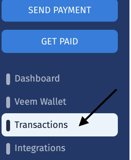
**Step 2:** On the left side of the screen, please click on ***Transactions***
******
**Step 3:** On the transactions page, click on the ***Payments*** tab.
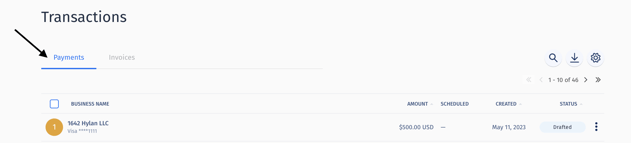
**Step 4:** Locate the transaction you want to get the payment confirmation. Hover over the transaction to reveal ***the blue arrow to the right.***
**
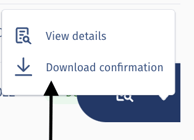
**Step 5:** Hover over the blue arrow click the 3 dots and click ***"Download Confirmation".***
**
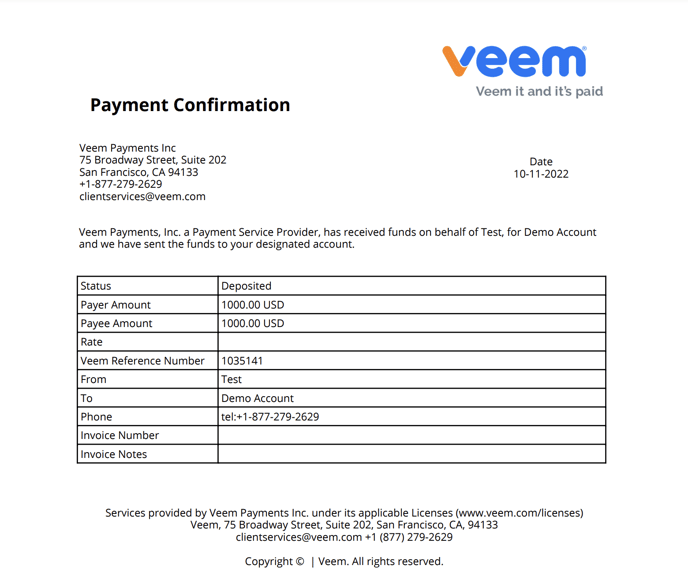
***Step 6:*** A payment Confirmation pdf file will be downloaded to your device with the payment details as seen below.
That's it! Need more help? [You can chat or call our Customer Success team here.](https://www.veem.com/contact/)
- [Product Updates](https://help.veem.com/product-updates?hsLang=en#main-content)
- [Changes to Veem Account | October 2026](https://help.veem.com/product-updates?hsLang=en#changes-to-veem-account-october-2026)
- [Changes to Veem Account | September 2026](https://help.veem.com/product-updates?hsLang=en#changes-to-veem-account-september-2026)
- [Changes to Veem Account | August 2026](https://help.veem.com/product-updates?hsLang=en#changes-to-veem-account-august-2026)
- [Changes to Veem Account | July 2026](https://help.veem.com/product-updates?hsLang=en#changes-to-veem-account-july-2026)
- [Changes to Veem Account | April 2026](https://help.veem.com/product-updates?hsLang=en#changes-to-veem-account-april-2026)
- [Changes to Veem Account | January 2026](https://help.veem.com/product-updates?hsLang=en#changes-to-veem-account-january-2026)
- [Changes to Veem Account | October 2025](https://help.veem.com/product-updates?hsLang=en#changes-to-veem-account-october-2025)
- [Changes to Veem Account | May 2025](https://help.veem.com/product-updates?hsLang=en#changes-to-veem-account-may-2025)
- [Changes to Veem Account | April 2025](https://help.veem.com/product-updates?hsLang=en#changes-to-veem-account-april-2025)
- [Changes to Veem Account | January 2025](https://help.veem.com/product-updates?hsLang=en#changes-to-veem-account-january-2025)
- [Changes to Veem Account | December 2024](https://help.veem.com/product-updates?hsLang=en#changes-to-veem-account-december-2024)
- [Changes to Veem account | September 2024](https://help.veem.com/product-updates?hsLang=en#changes-to-veem-account-september-2024)
- [Changes to Veem account | July 2024](https://help.veem.com/product-updates?hsLang=en#changes-to-veem-account-july-2024)
- [Changes to Veem account | August 2023](https://help.veem.com/product-updates?hsLang=en#changes-to-veem-account-august-2023)
- [Changes to Veem account | January 2023](https://help.veem.com/product-updates?hsLang=en#changes-to-veem-account-january-2023)
- [Changes to Veem account | July 2022](https://help.veem.com/product-updates?hsLang=en#changes-to-veem-account-july-2022)
- [Changes to Veem account | June 2022](https://help.veem.com/product-updates?hsLang=en#changes-to-veem-account-june-2022)
- [Changes to Veem account | May 2022](https://help.veem.com/product-updates?hsLang=en#changes-to-veem-account-may-2022)
- [Veem Wallet](https://help.veem.com/veem-wallet?hsLang=en)
- [Virtual Bank Account](https://help.veem.com/virtual-bank-account?hsLang=en)
- [Veem Virtual Card](https://help.veem.com/veem-virtual-card?hsLang=en)
- [Security and Compliance](https://help.veem.com/security-and-compliance?hsLang=en)
- [Accountant and Bookkeepers](https://help.veem.com/accountant-and-bookkeepers?hsLang=en)
- [Getting Started for Business](https://help.veem.com/getting-started-for-business?hsLang=en#main-content)
- [Getting Started - Business Account](https://help.veem.com/getting-started-for-business?hsLang=en#getting-started-business-account)
- [Getting Started for Contractors](https://help.veem.com/getting-started-for-contractors?hsLang=en#main-content)
- [Getting Started - Individuals, Contractors and Sole Proprietorship accounts](https://help.veem.com/getting-started-for-contractors?hsLang=en#getting-started-individuals-contractors-and-sole-proprietorship-accounts)
- [Veem Integrations](https://help.veem.com/veem-integrations?hsLang=en#main-content)
- [Xero](https://help.veem.com/veem-integrations?hsLang=en#xero)
- [Zapier](https://help.veem.com/veem-integrations?hsLang=en#zapier)
- [Integrations FAQ](https://help.veem.com/veem-integrations?hsLang=en#integrations-faq)
- [Netsuite](https://help.veem.com/veem-integrations?hsLang=en#netsuite)
- [QuickBooks](https://help.veem.com/veem-integrations?hsLang=en#quickbooks)
- [Signing Up on Veem](https://help.veem.com/signing-up-on-veem?hsLang=en)
- [Account Management](https://help.veem.com/account-management?hsLang=en#main-content)
- [Manage your Veem Account](https://help.veem.com/account-management?hsLang=en#manage-your-veem-account)
- [Updating Banking Information](https://help.veem.com/account-management?hsLang=en#updating-banking-information)
- [Updating the Account](https://help.veem.com/account-management?hsLang=en#updating-the-account)
- [Beneficial Ownership Information](https://help.veem.com/account-management?hsLang=en#beneficial-ownership-information)
- [Veem Basics FAQ](https://help.veem.com/veem-basics-faq?hsLang=en)
- [Sending Payments](https://help.veem.com/sending-payments?hsLang=en#main-content)
- [Payment Tracker](https://help.veem.com/sending-payments?hsLang=en#payment-tracker)
- [Mass Pay](https://help.veem.com/sending-payments?hsLang=en#mass-pay)
- [Payments FAQ](https://help.veem.com/sending-payments?hsLang=en#payments-faq)
- [Pay Direct](https://help.veem.com/sending-payments?hsLang=en#pay-direct)
- [Guest Pay](https://help.veem.com/sending-payments?hsLang=en#guest-pay)
- [Pay with Credit Card or Debit Card](https://help.veem.com/sending-payments?hsLang=en#pay-with-credit-card-or-debit-card)
- [Pay with Veem](https://help.veem.com/sending-payments?hsLang=en#pay-with-veem)
- [Receiving Payments](https://help.veem.com/receiving-payments?hsLang=en#main-content)
- [Get Paid with Veem](https://help.veem.com/receiving-payments?hsLang=en#get-paid-with-veem)
- [Instant Deposit - Debit Card](https://help.veem.com/receiving-payments?hsLang=en#instant-deposit-debit-card)
- [Payment Troubleshooting](https://help.veem.com/payment-troubleshooting?hsLang=en#main-content)
- [Bank Information Tips & Updates](https://help.veem.com/payment-troubleshooting?hsLang=en#bank-information-tips-updates)
- [Payment Troubleshooting FAQs](https://help.veem.com/payment-troubleshooting?hsLang=en#payment-troubleshooting-faqs)
- [How - To Videos](https://help.veem.com/how-to-videos?hsLang=en)
- [Payment Tracker Statuses](https://help.veem.com/payment-tracker-statuses?hsLang=en)
[](http://www.veem.com/https://www.veem.com/?utm_source=hubspot&utm_medium=email&utm_campaign=email_marketing)
1160 Battery Street,
Suite 100
San Francisco, CA 94111
Copyright © 2026, Veem Inc