
Once activated, to receive funds in the Veem Wallet:
Step 1: Please begin by navigating to the account settings on the dashboard
Step 2: Please go to the Get Paid tab on the settings page.
Step 3: Under Defaults, locate the default receiving account drop-down menu at the bottom of the page, then select Veem Wallet.
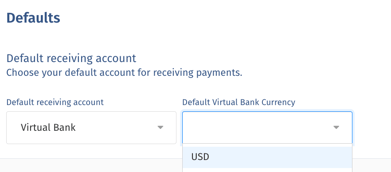
Step 4: Once the Veem Virtual Bank Account is set as the default receiving account, new payments are directly deposited into it.
That's it. Once funds are deposited in the Virtual Bank Account, clients can choose to use them to send payments to other vendors or withdraw funds from their wallet to their bank account.
Still need help? You can chat or call our Customer Success team here.